
For sponsors
Offer a scholarship. Reach the students who qualify.
One place for schools, government offices, foundations, NGOs, companies and private donors. Post a scholarship, check who fits the rules you set, and decide together — without building any of it.

Which of these is you?
All four do the same job here. They just worry about different things.
Foundations, NGOs and companies
You run the same award every year and answer to a board or a head office. Each round keeps its own numbers, and every decision is written down as it is made.
Schools and universities
You hand out your own grants and your students want outside help too. Financial aid, the dean’s office and the committee can all work the same list.
Government offices and LGUs
A national agency, a province or a city hall — your help is meant for the people you serve. Once our team confirms the area you cover, living there becomes one of the rules on every listing.
One person or an alumni group
You do not need a foundation to do this well, alone or as a batch. Post what you are offering, see who fits, and pick — all of it free to start.
What you get
Run a round, not a poster
A scholarship lives for years. Each round keeps its own dates, places, rules and papers, so opening next year’s does not touch this year’s.
Rules that do the first pass
Set a grade average and the places you cover. Everyone who applies arrives with those rules already checked — met, not met, or not yet known.
Decide as a team
Invite your people as an admin, a manager or a reviewer. Move students through the stages, and keep internal notes that students never see.
Targeting that respects your mandate
A government or city office can publish only inside the area our team has confirmed it covers. A city office cannot target the whole province by accident.
See whether students found it
Views, saves and reactions across your scholarships. Each round also shows its own views and how many applied.
A verified mark on your listings
Our team checks each organization by hand. Once yours is checked, students see a verified mark on every scholarship you post.
How a round actually runs
Four steps, from the day you post it to the day you know whether students found it.
Step 1
Post it on your own terms
A four-step form: the basics, who can apply, the papers you want. Then a look at the whole thing before it goes out.
- Set the amount, the places, the closing date and how many you will fund
- Ask for exactly the papers you need, and nothing more
- Save it as a draft and come back — nothing is public until you publish
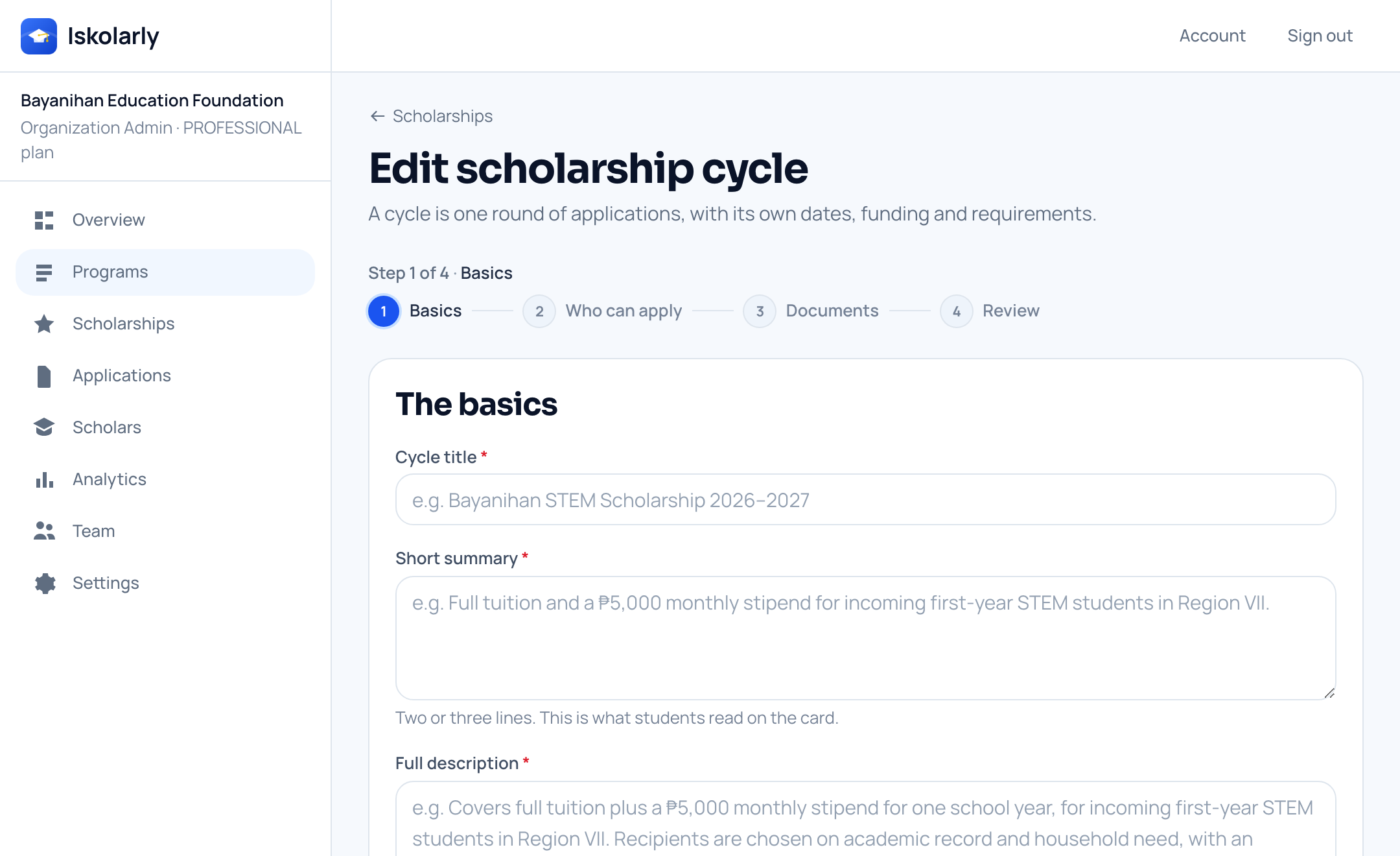
The four-step form for setting up a round. Example details shown. Step 2
Everyone arrives already checked
Your rules run as each form comes in. Sort the list by best match to see who fits what you asked for first.
- Search by name, and filter by stage, course or region
- A blank detail shows as not yet known on that rule, never as failed
- Someone who misses a rule can still apply, so nobody is hidden from you
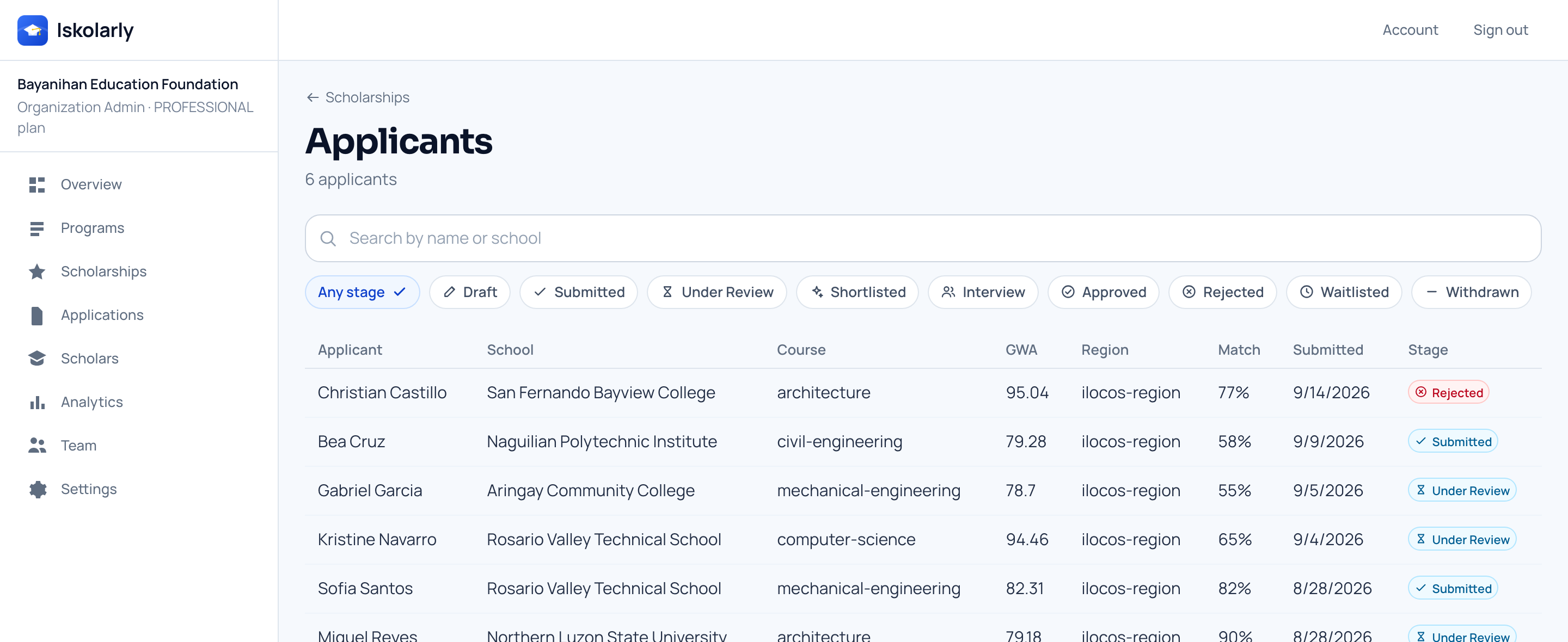
Everyone who applied to one round, with their school, course and grades. Example details shown. Step 3
Give each person the right access
Three roles, and you choose which one each of your people gets. A reviewer can read and comment but cannot publish or approve.
- An admin runs the organization; a manager runs the scholarships
- A reviewer reads and comments, and that is all
- Everyone sees the same status at the same time
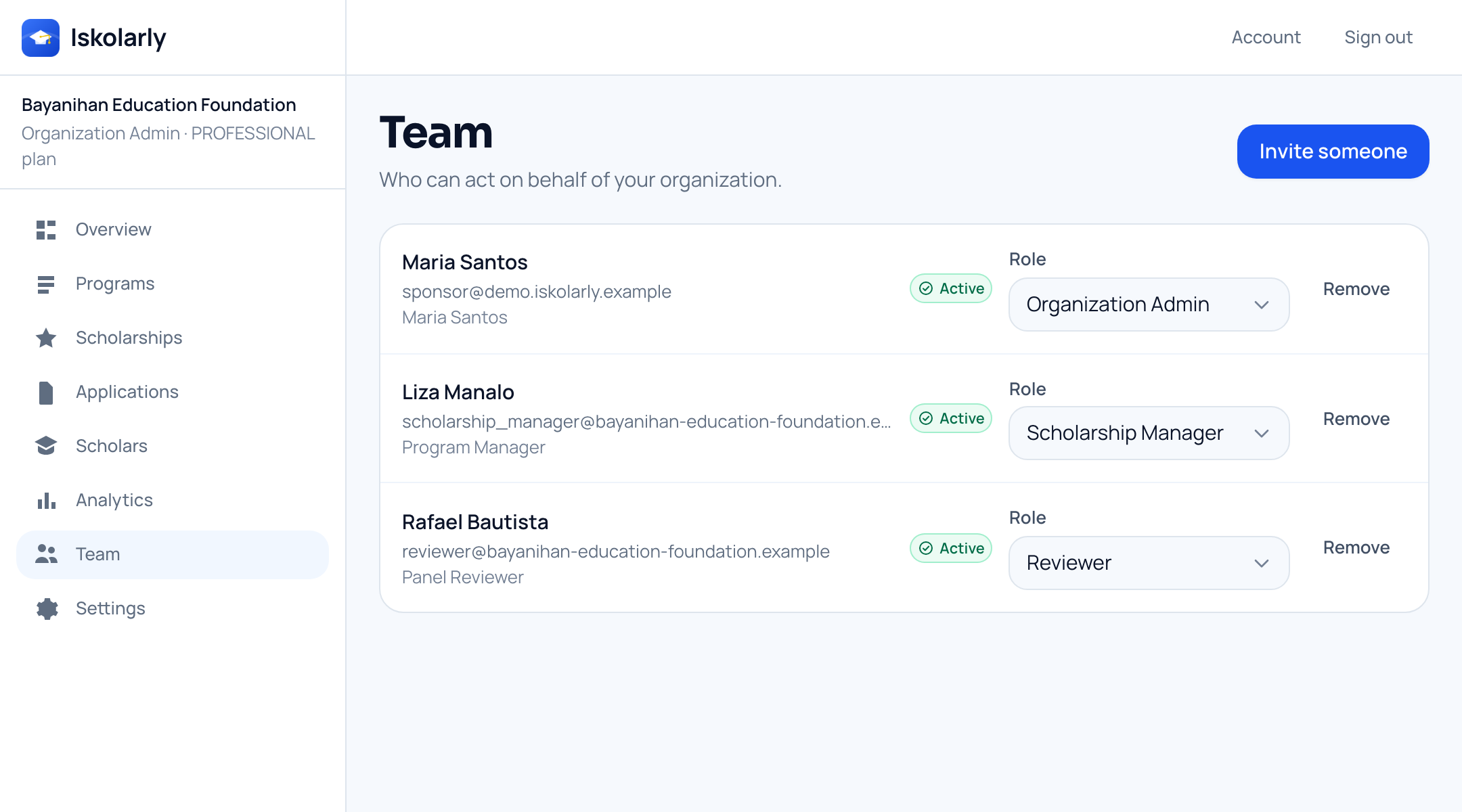
Your team, and the role each person holds. Example details shown. Step 4
See whether it actually reached anyone
How many students saw your listings, saved them and applied. Each round also shows its own views and applications.
- Counts only: how many, never who
- Pick the last week, month or three months
- Tells you whether the problem was reach or the offer itself
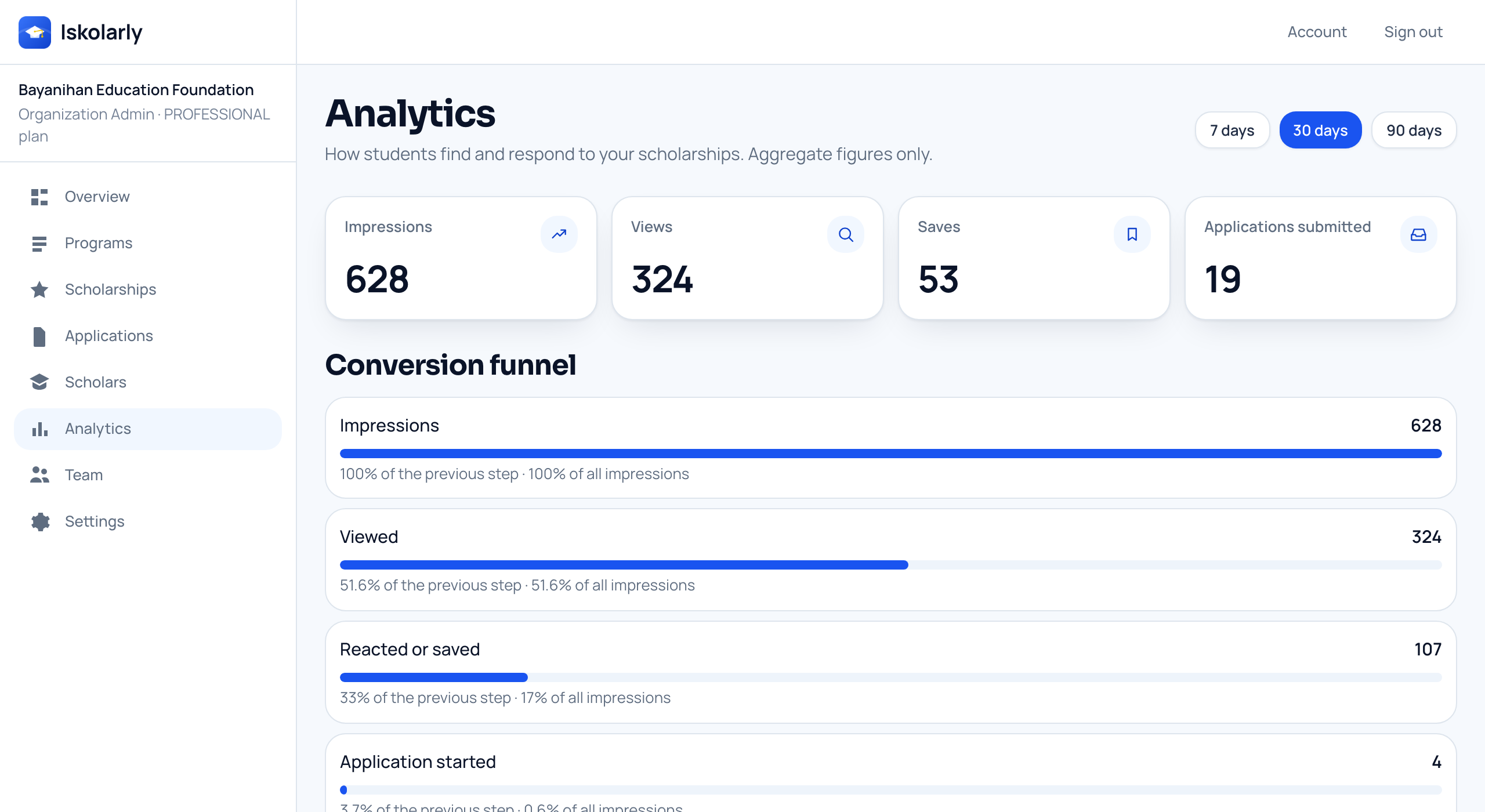
Views, saves and applications over time for your scholarships. Example details shown.


What you end up with
- list instead of an inbox and a spreadsheet
- One
- decision written down as it happens
- Every
- to start, with no card and no call
- Free
Plans
Start free. Every plan includes rule checking, the papers students attach, search and filters, your numbers, and your own logo and cover. Plans differ in how many scholarships you can have open and how many people can join your team. There is no checkout yet — tell us what you need and we will set it up.
Free
Free
Small foundations, alumni associations, individual donors
Post your first scholarship and keep everyone who applied in one place.
- 1 scholarship open at a time
- Up to 2 people on your team
- Everyone who applied, in one list
- Students reuse their profile and their papers
- Students are emailed when their application moves
Growth
Talk to us
Growing foundations, companies, private universities
Run several scholarships at once, with room for a small team.
- Up to 10 scholarships open at once
- Up to 10 people on your team
- Everything in Free
Professional
Talk to us
Large foundations, corporate CSR programs, university systems
More scholarships open at once, and room for a bigger team.
- Up to 50 scholarships open at once
- Up to 50 people on your team
- Everything in Free
Not built yet
- Stages you set yourself
- Scoring and reviewer assignment
- Downloadable reports
Enterprise
Talk to us
Government agencies, LGUs, state universities, large foundations
No limit on scholarships or team, with someone to help you set it up.
- No limit on scholarships or team size
- Someone to help you set it up
- Everything in Free
Not built yet
- Single sign-on
- API access and webhooks
- Links to your own systems
Questions
Before you start
- What does it cost?
- Starting is free, and the free tier is a working scholarship, not a trial. Larger plans exist but there is no checkout yet — tell us what you need and we will set it up.
- Do we need a foundation, or a legal entity?
- No. One person funding one student uses the same tools a foundation does. What changes is how many scholarships you can have open at once, and how many people can join your team.
- How does the verified mark work?
- A person on our team checks each organization by hand and marks it verified. Nothing is checked automatically. Once yours is marked, students see it on every scholarship you post.
- Can we choose who is allowed to do what?
- Yes. Invite each of your people as an admin, a manager or a reviewer. A reviewer can read forms and leave notes, but cannot publish a scholarship or approve a student.
- Can we see the papers a student uploaded?
- You see which papers were attached, but not the files themselves. A student’s records stay in their own account — that is the promise we make to them.
- We only give help inside our city. Will it go further?
- No. A government or city office can only target the area our team has confirmed it covers, and living there becomes one of the rules. The area you type in when you sign up grants nothing on its own; a person confirms it.
Sign up today
It is the same sign-up students use. You choose an organization account after we email you a link.
Already have an account? Sign in
Not sure what to fund, or how to choose? Read the guide to starting a scholarship.
Not ready yet? Get updates by email.
Say which of these you are. We will email you scholarship news and product updates, and nothing else.